 Add to Chrome
AI-powered note taking
HoverNotes watches with you and writes structured notes — capturing the equations, code blocks, and on-screen detail a transcript misses. In any language, no captions required.
HoverNotes watches videos with you and turns them into clean, structured notes — capturing the on-screen code, equations, and diagrams a transcript misses. Let the AI write them as you watch, or take your own, all saved to your Obsidian vault.
 Saves directly to your Obsidian vault
Join thousands of students, professionals, and lifelong learners who use HoverNotes to enhance their video learning experience.




See the output
HoverNotes sits right beside your video and turns it into structured AI notes as you watch — with timestamped screenshots of the code, equations, and diagrams, saved to your Obsidian vault.
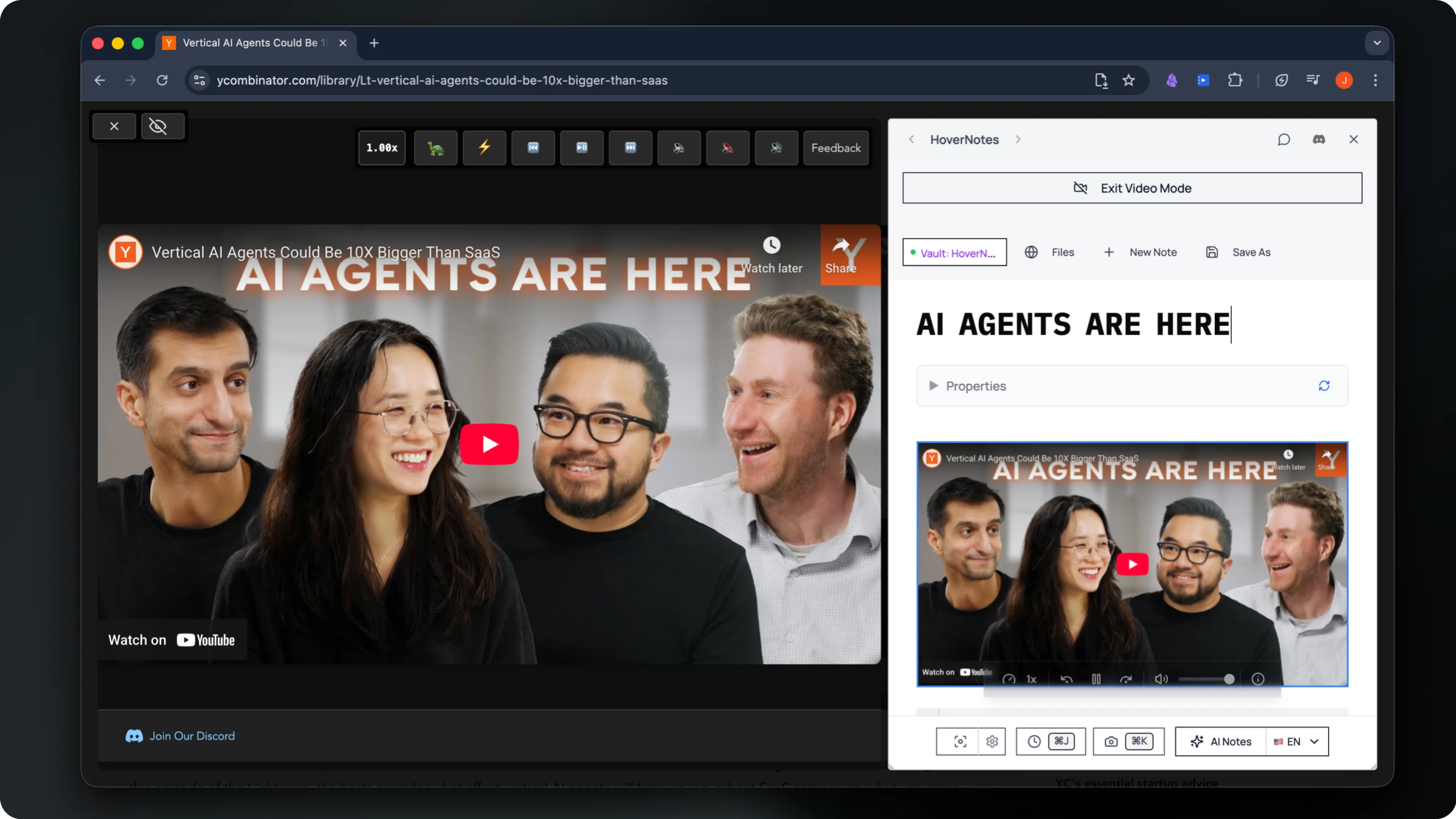
Watches the video live and writes structured AI study notes as you go
Captures timestamped screenshots of on-screen code, equations & diagrams
Saves everything privately to your own Obsidian vault
Transcript tools just read the captions — so they miss the code, equations, and diagrams on screen. HoverNotes' visual AI watches alongside you and writes it all down.
HoverNotes sees what's actually on screen — capturing code snippets, diagrams, and equations exactly as they appear. It works even when a video has no captions at all.
Syntax-highlighted code blocks, proper markdown headings and bullet points, organized and ready to drop straight into your Obsidian vault.
YouTube, Udemy, Coursera, university lectures, or local files. If it plays in your browser, HoverNotes takes notes — in whatever language you prefer.
AI notes, instant screenshots, and local-first Obsidian sync — learning from videos has never been this effortless.
HoverNotes watches with you and writes structured notes — capturing the equations, code blocks, and on-screen detail a transcript misses. In any language, no captions required.
Pure markdown, stored locally on your device. Yours forever — and ready for Obsidian, Logseq, or Roam.
One click drops a screenshot into your notes at the exact moment — perfect for diagrams and demos.
A focused, ad-free workspace opens beside any video, so you can watch, think, and capture without tab-hopping.
Watch from 0.1x to 16x with audio pitch preserved, jump to any moment from a note's timestamp, and drive it all with keyboard shortcuts.
Course platforms, university lectures, conference talks, even local files on your computer. If it plays in your browser, HoverNotes works on it — no setup per site.
From YouTube tutorials to Udemy and Coursera courses to Bilibili lectures — HoverNotes works natively on 20+ platforms, with the same one-click notes everywhere.
Questions
AI video notes are structured notes generated automatically while you watch a video. HoverNotes' AI watches the video alongside you — capturing the on-screen code, equations, diagrams, and key points — and writes them up as clean Markdown saved to your Obsidian vault, so you don't have to pause and type.
Most tools only read the transcript, so they miss anything shown visually. HoverNotes actually watches the video — capturing timestamped screenshots of code snippets, diagrams, and equations exactly as they appear on screen — and works even when a video has no captions at all.
Yes. Because the AI watches the actual video frames rather than relying on a transcript, it generates notes even when captions are disabled — ideal for coding tutorials, lectures, and diagram-heavy content.
Both. Let the AI watch and write structured, timestamped notes automatically — or jot your own notes by hand and click any note to jump back to that exact moment. Use whichever fits the video.
Locally and privately. HoverNotes is local-first: your notes and timestamped screenshots are saved as plain Markdown directly to your own Obsidian vault. Nothing is stored in the cloud, so your notes stay yours.
HoverNotes has a free Starter plan: manual note-taking, screenshot capture, video controls and Obsidian export are all free, plus 20 minutes of AI video notes to try. When you want more, upgrade to Unlimited Pro for unlimited AI notes — cancel anytime.
Yes. HoverNotes generates AI notes on any video that plays in your browser — YouTube, Udemy, Coursera, LinkedIn Learning, university lectures, and local files — in whatever language you prefer.
Add HoverNotes to Chrome and let AI capture the code, equations, and diagrams as you watch — or take your own notes — all saved to your own Obsidian vault.
Free Starter includes 20 minutes of AI notes • Upgrade anytime